OPENING QUESTIONS: What do we mean by the term "redundancy" in both our day to day lives (Think PSD!) or in the tech/server/router Universe?
OBJECTIVES: I will be able to describe how redundancy is built into internet data warehouses during today's class.
CALENDAR:
WORDS FOR TODAY:
I STRONGLY URGE YOU TO START A DECK OF FLASH CARDS HERE
- abstraction (a layer between hardware/software hidden to the user)
- innovation: "A new or improved idea, device, product, etc
- prototype: "A proof of concept"
- bandwidth: Transmission capacity measure by bit rate
- latency: Time it takes for a bit to travel from its sender to its receiver.
- protocol: A set of rules governing the exchange or transmission of data between devices
- router: "Traffic Cop"
- packets: Discreet blocks of internet traffic sent between computers & servers as directed by routers.
- Port - one of 64,000 'doors' available to access your computer from the outside world
- Server - A computer designed to process specific data requests from users
- TCP - Transfer Control Protocol - Provides connection information to a specific port on a specific server on the interweb
- IP - Internet Protocol - Provides Name/Address information to a specific server on the interweb
- HTTP: Hyper Text Transfer Protocol
- Root Servers (Manage the DNS system)
- DNS - Domain Name System -- The service that translates URLs to IP addresses
- Redundancy (Backups and Many Paths)
- FAULT TOLERANCE
- XOR logic
- Parity Bits
WORK O' THE DAY:
Recall that the lowest level of data in computer science is a bit, which can be a 0 or a 1.
That is the basis for all of computing!
Imagine that we are testing for voltage in a certain system. We can store the results of that test as either 1 (voltage is present) or 0 (voltage is absent).
Imagine we are testing whether a certain circuit is open or closed. We can store the results of that test as either 1 (open) or 0 (closed)
We could really use bits anytime a presence/absence is tested for or perhaps more importantly whether a statement is True (1) or False (0):
Let's say we have a program running that checks to see if some condition is true (is Eric present in class today?) That statement is either True (1) or False (0).
There is a WHOLE branch of math devoted to that logic/algebra called Boolean Algebra. Despite the fact that it only deals with True/False conditions it can get pretty involved. Folks who enjoy formal logic (Is it NOT True that Eric is in class today AND is it False that Eric is NOT at home OR NOT in choir practice) tend to love Boolean Algebra.
Fortunately we'll only take a slight whiff of that, but for right now we are only going to talk about OR and XOR (eXclusive Or) logic.
OR logic is written like this:
A OR B
An OR statement asks whether A or B is True. If EITHER of those statements is True then the entire statement is True.
It follows, then (I hope), that both statements must be False in odder for an OR statement to be False.
So-- let's say we set:
- A to 1 and B to 0. What is A OR B?
- A to 1 and B to 1. What is A OR B?
- A to 0 and B to 0. What is A OR B?
- A to 0 and B to 1. What is A OR B?
The eXclusive XOR logic is written like this:
A XOR B
An XOR statement asks whether A or B is True without both of them being True. If EITHER of those statements is True AND they both aren't True then the entire statement is True.
It follows, then (I hope), that if both statements are True then the entire statement is False AND if both statements are False the entire statement is False.
- A to 1 and B to 0. What is A OR B? What is A XOR B?
- A to 1 and B to 1. What is A OR B? What is A XOR B?
- A to 0 and B to 0. What is A OR B? What is A XOR B?
- A to 0 and B to 1. What is A OR B? What is A XOR B?
Now we'll jump into the wonderful world and mystic arts of Parity Bits. Parity Bits are an amazing way to ensure redundancy.
Have you ever heard of RAID tech? (Do you have a guess at what RAID stands for?)
This remarkable technology allows us to almost immediately re-create data when a hard drive or related equipment is lost.
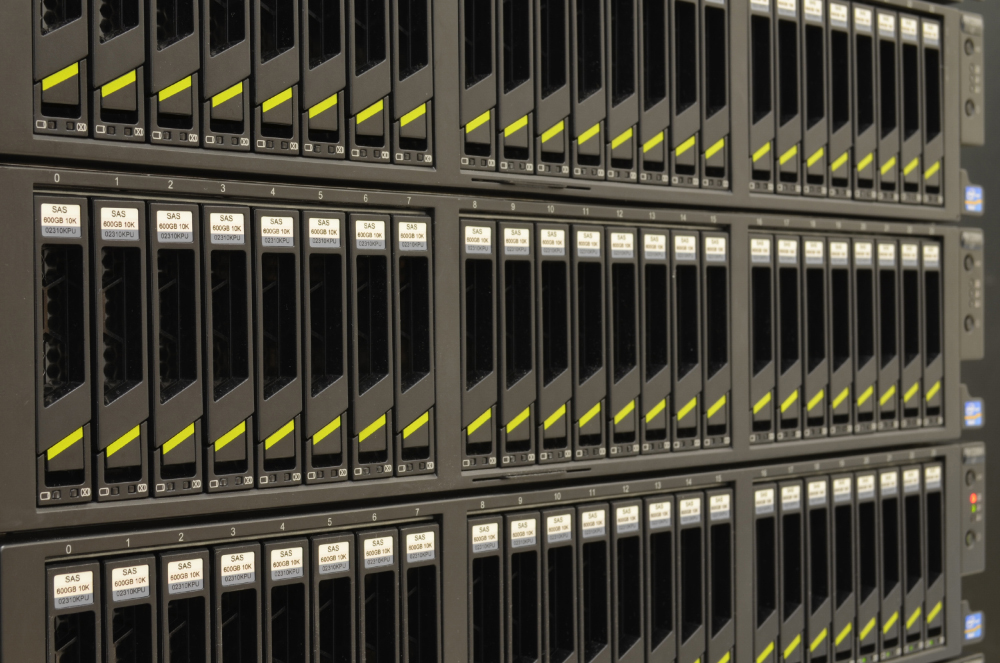
Image rows of computer hard drives such as those in the image below. That image shows sections of a data 'rack'. Each section contains eight 6 terabyte hard drives. There are 3 sections in each row so each row contains 24 x 6 terabyte hard drives.
Now imagine there are 10 such rows in a cabinet in a big ol' data warehouse somewhere. That brings us up to 240 terabytes of hard drives per cabinet.
Now further image there are 50 cabinets on one side of a hallway in the data warehouse and 100 cabinets on the other side of the hallway. That brings us to 12,000 terabytes of hard drives
Now imagine each data warehouse has 10 hallways. Now we are up to 120,000 terabytes of data on those hard drives (1.2 x 1017 bytes)
Now imagine all the data warehouses that companies like Facebook, Google, Amazon and other major tech corporations have built at various places around the world and you have some idea of the immense amount of data store on individual hard drives around the world!
NOW LET us further imagine that hard drive #5 in row #4 in cabinet #12 in hallway #2 suddenly fails.
Someone in the control room sees a message or a light flashes. They grab a spare hard drive, walk over to the hallway, to that cabinet, to that row, to that hard drive and, sure enough, a red light is flashing there that shows the hard drive is dead (or dying!).
They pull the bad hard drive out, and slide in a new one.
Within 10 - 20 minutes that hard drive is good as new and contains ALL of the missing hard drive data.
How is that possible?
I give you XOR parity bits:
Please take a gander at THIS wikipedia article (I've copied and pasted the relevent parts below):
For example, suppose two drives in a three-drive RAID 5 array contained the following data:
Drive 1: 01101101 Drive 2: 11010100 To calculate parity data for the two drives, an XOR is performed on their data:
01101101 XOR 11010100 10111001 The resulting parity data, 10111001, is then stored on Drive 3.
Should any of the three drives fail, the contents of the failed drive can be reconstructed on a replacement drive by subjecting the data from the remaining drives to the same XOR operation. If Drive 2 were to fail, its data could be rebuilt using the XOR results of the contents of the two remaining drives, Drive 1 and Drive 3:
Drive 1: 01101101 Drive 3: 10111001 as follows:
10111001 XOR 01101101 11010100 The result of that XOR calculation yields Drive 2's contents. 11010100 is then stored on Drive 2, fully repairing the array.